Contact Us

If you still have questions or prefer to get help directly from an agent, please submit a request.
We’ll get back to you as soon as possible.

Please fill out the contact form below and we will reply as soon as possible.

English (US)
US English (US)
MX Spanish (Mexico)
  • Home
  • On Board Programming

1997 Pontiac Bonneville Remote Programming Instructions

Written by Cole Fuquay

Updated at September 29th, 2025

Contact Us

If you still have questions or prefer to get help directly from an agent, please submit a request.
We’ll get back to you as soon as possible.

Please fill out the contact form below and we will reply as soon as possible.

  • Key Cutting Equipment
    Gymkana 045 ILCO Key Machine Bianchi 303 Key Machine
  • Universal EZ Installer
  • On Board Programming
  • Pairing Equipment
    IM508 SmartBox SmartBox Mini SmartPro
  • Simple Keys
    CDJ Combo Simple Key CDJ Fobik Simple Key CDJ Smart Key Simple Key Ford Combo Simple Key GM Flip Simple Key Honda Combo Simple Key Nissan Smart Key Simple Key Nissan Combo Simple Key Toyota Combo Simple Key
  • Support Documentation
  • Universal Remotes
    Universal Remote Classic Universal Remote
  • Vehicle Information
    CDJ FAQs Ford FAQs Honda FAQs Mazda FAQs Subaru FAQs
  • NASTF Resources
  • FAQs
    General FAQs
  • Latest Updates
    Tech Tuesday
  • OEM Programmers
    Ford OE Programmer Audi/VW OE Programmer JLR OE Programmer Volvo OE Programmer Toyota OE Programmer GM OE Programmer CDJ OE Programmer Nissan OE Programmer
  • CKE Programmer Manuals (dongles)
    Onboard Programmable Remotes GM Remote With Dongle EZ Installer Pro Classic
  • ROKS Box Information
  • Programming Advice
  • General Key Information
+ More
  1. Close all doors.
  2. Insert keys in ignition and leave in the off position.
  3. Locate the OBDII port under driver's side dashboard. Note port is wider at top: your OBDII port will not have numbers. Use this for reference:
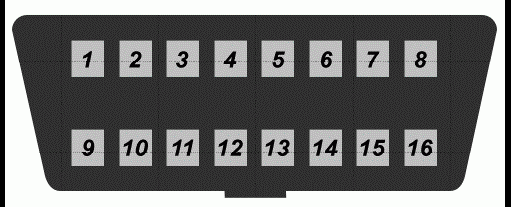
    ob2portdiagram
  4. Make sure there are metal contact pins in terminals 8 and 4.
  5. connect 8 and 4 with a suitable jumper wire (leave jumper wire connected throughout the programming procedure.) Make sure you know which terminals are 8 and 4.
  6. The vehicle will respond by locking and unlocking the doors to signify entering of programming mode.
  7. Turn ignition to the on position (as far as you can go without cranking the engine). Doors will lock.
  8. Press and hold both the lock and unlock buttons together on the first remote to be programed up to 30 seconds.
  9. The vehicle will respond by locking then unlocking the doors.
  10. Release buttons.
  11.  Within one minute, repeat Step 6 for any additional remotes, if any, including existing remotes.
  12. Remove jumper wire from OBDII port.
  13. Test remote(s).
bonneville programming 1997 pontiac on board programming remote

Was this article helpful?

Yes
No
Give feedback about this article

Related Articles

  • 1996 Pontiac Bonneville Remote Programming Instructions
  • 1997 Honda Civic Remote Programming Instructions
  • 1996 Mitsubishi Expo Remote Programming Instructions
  • Customer Support
  • Contact Us
  • Return Policy
  • Terms & Conditions
  • App Terms & Conditions
  • Other Services
  • Buy Back Program
  • Locksmith Referral Registration
  • About
  • Our Story
  • Careers
  • Technology Leaders
  • What Drives Us
  • CKE Cares
  • News and Events
  • Reviews
  • Contact
  • Contact
  • 12101 Sycamore Station Place
  • Suite 140
  • Louisville, KY 40299
  • 1-877-445-3953
  • M-F 8:30am - 9:00pm EST

© 2024 Car Keys Express

Replacing car keys is simple and affordable again.™

Expand